

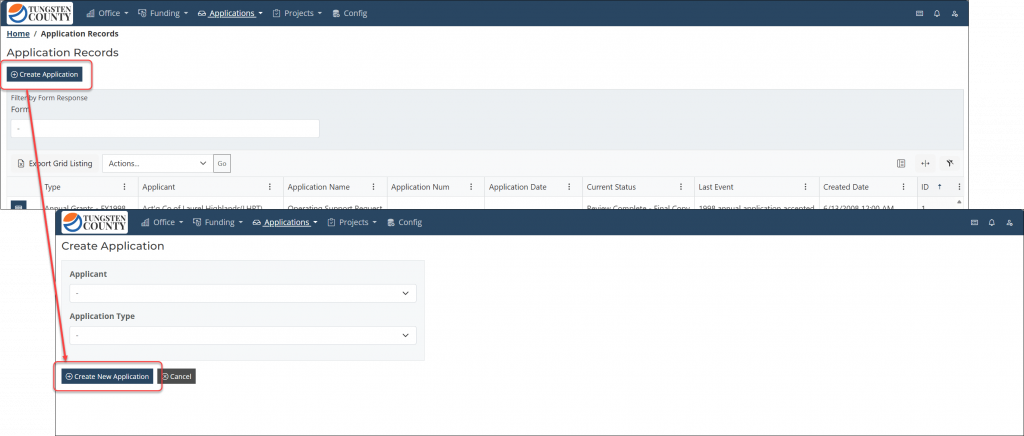
NewCreate new "Program Application" records for "Applicants" directly from within the Admin Portal.
Admin Portal users no longer need to create user accounts in the Public Portal to create and submit “Program Application” records on behalf of an “Applicant”. You can now click the “Create Application” button, select the “Applicant” and “Application Type”, and then proceed to either 1) set a deadline if needed and allow the “Applicant” to complete and submit forms as usual, or 2) complete and submit forms directly within the Admin Portal. Admin Portal users are subject to the same validation rules as the “Applicant”, so whether submitted from the Public Portal or Admin Portal, you will be getting consistent data. This new feature is especially useful if:
- An “Applicant” sends “Program Application” form data outside of the platform (e.g., in the form of a PDF or Word document), or is unable to use the platform (e.g., their organization or agency has strict IT rules that only allow them access to certain websites).
- Either the “Application Type” deadline has passed and you need to allow for an exception, or you would like control which “Applicants” are able to start and submit “Program Application” forms (e.g., if the “Application Type” is specific to a certain industry or sub-set of your “Applicants”).
NewSubmit "Program Application" forms from within the Admin Portal.
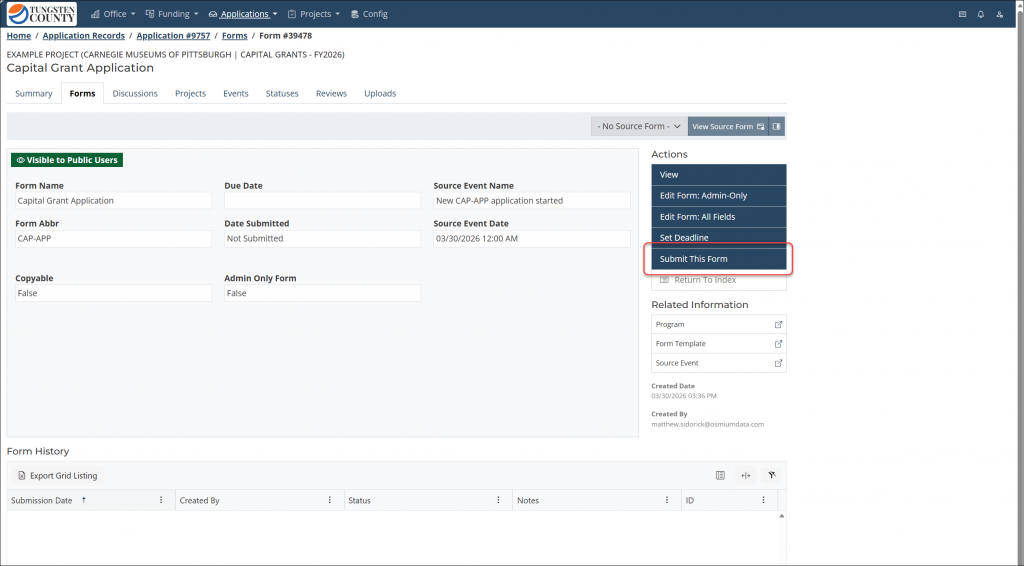
In addition being able to un-submit Any “Program Application” form, Admin Portal users can now submit forms. This can be useful if an “Application Type” Date Open Thru has passed, but you still need to submit a form on behalf on an “Applicant”.
Additionally, this means that admin-only forms that may need to be added to a “Program Application” record can also be submitted to indicate that they are not only created and exist, but also that they are finished. Any validation rules added to an admin-only form will be enforced on submission, so you will also not only know that an admin-only form is finished, but also that it is complete per your internal requirements.
NewAdmin Portal users can enter native Review records for "Payment Requests", "Organization Invoices", "Projects", and "Program Application" records
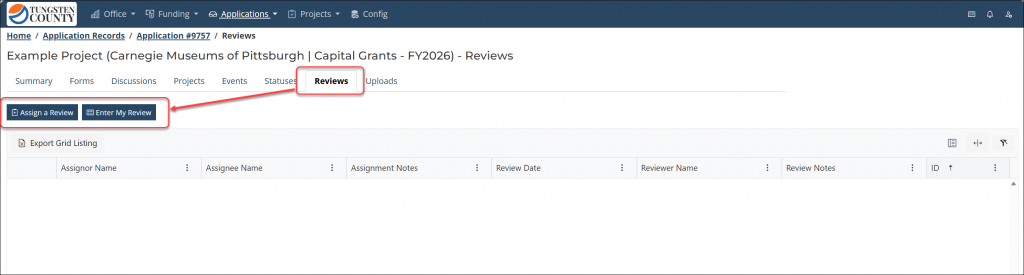
There is a new Reviews tab on the supported entities to view and manage its associated reviews. This new feature is free-form in the sense that any Admin Portal user can assign a Review to any other Admin Portal user, and can also quickly enter their own Review record when needed. Admin Portal users assigned a Review will receive a notification with links to both the assigned review record and the related entity record, including any notes/instructions added by the assignor. Any Admin Portal user can see their assigned reviews that have not been completed by clicking a new icon in the top-right of the navigation header.
This feature can be used not only to provide instruction and solicit feedback from another Admin Portal user, but also to notify other Admin Portal users that an entity record is ready for the next step in a workflow. For example, if a “Project” Payment Request is complete and payable, then the Admin User who has initially checked the Payment Request items and attachments for accuracy may want to 1) enter their own Review record to make any needed comments, and then 2) assign a Review to another Admin User in the fiscal department to continue the process of paying the request that has been verified as complete.
ImprovedThe Form Visualizer is now "Forms Management" and has been refactored/expanded
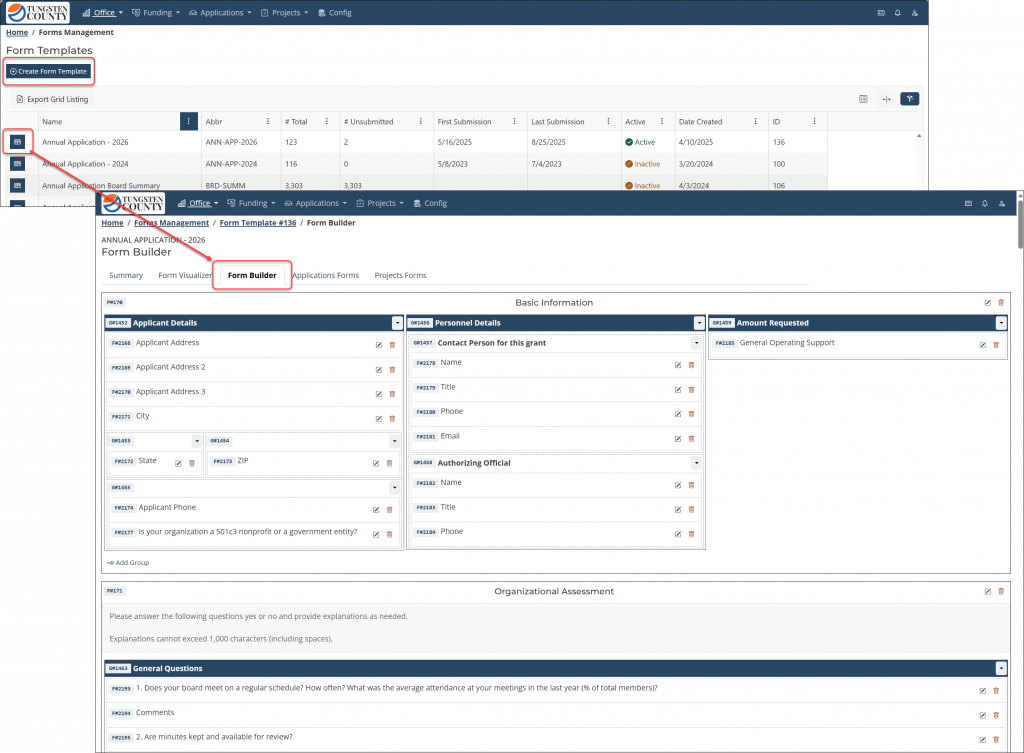
The Form Visualizer continues to be the familiar read-only view of form layout, field relationships, and validation rules. The new Form Builder is a comprehensive tool to allow you to edit form structure and validation rules using a blueprint-style editor. Additionally, there is a Datapoint Manager that allows you to manage both 1) where form responses are stored and 2) the available list options for form fields that use select controls (e.g., checkboxes, drop-downs, etc.) rather than text boxes.
Admin Portal users can both 1) clone existing forms into new versions, as well as 2) create new forms from scratch. In upcoming versions, other new features will be released to allow you to add newly-created forms to a “Program Application”, “Project”, or other platform workflows. Note: due to the expansiveness of these new Form Builder tools, only Admin Portal users in the “Administrator” role have automatically inherited access to these new tools – access can be granted to other users by either 1) creating a custom role and adding users to it, or 2) adding specific routes to an individual user.
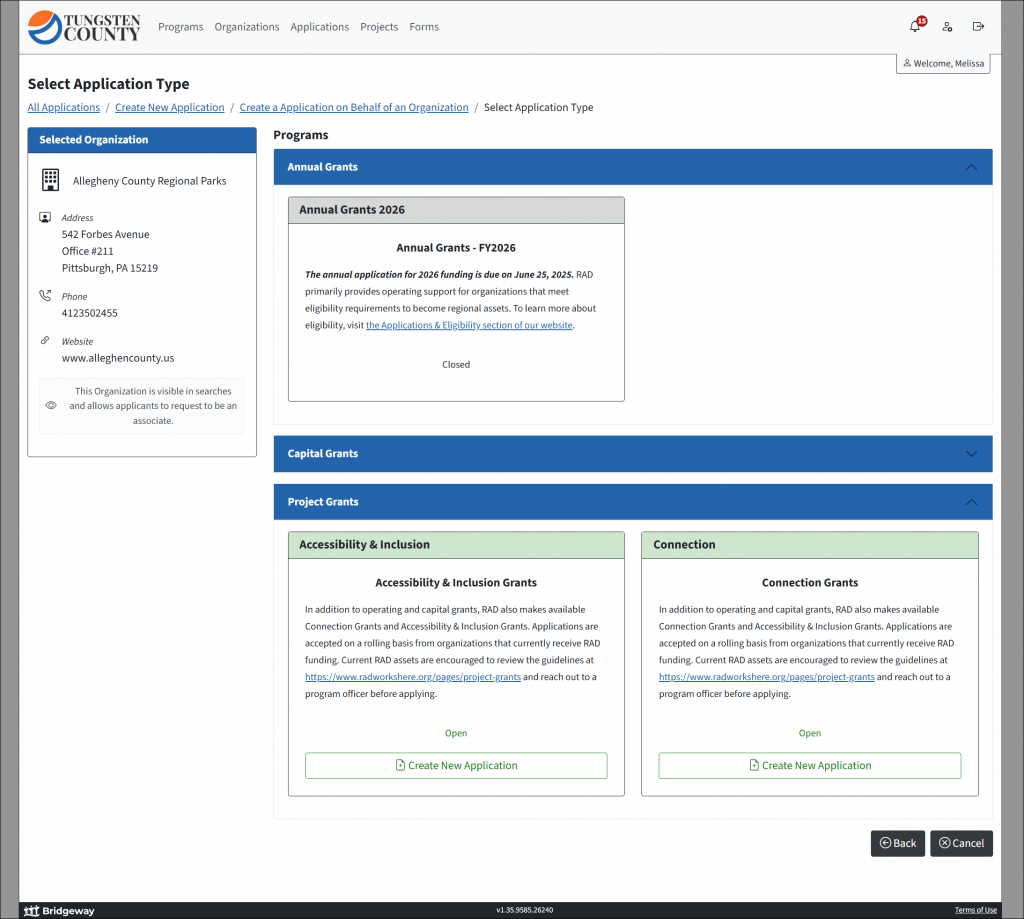
ImprovedThe Public Portal "Program Application" create experience has been upgraded to make it better organized and more intuitive
When Public Portal users are ready to start a new “Program Application”, they will now see “Application Type” cards grouped by their respective parent Program. This not only allows for many more cards to be displayed without overwhelming your users, but also presents the opportunity for the Program itself to be described separately from its “Application Type” options. For example, if you have various types of “Application Types” within a single Program from which an “Applicant” could select, then that user would see both a description of the overall Program as well as a separate description of each “Application Type” within it.
The Programs navigation menu item in the Public Portal also now provides a “Get Started” button for any “Application Types” within a Program that are currently open.
All Release Notes
- Create new “Program Application” records for “Applicants” directly from within the Admin Portal.
- Submit “Program Application” forms from within the Admin Portal.
- Forms created by Public Portal “Applicants” can be submitted on their behalf.
- Forms created in the Admin Portal that are admin-only can also now be submitted to indicate that they are complete.
- Admin Portal users can now Set Deadline for “Program Application” forms, which supersedes the “Application Type” Date Open Thru value, allowing for exceptions to “Application Type” from/thru dates.
- Admin Portal users can enter native Review records for “Payment Requests”, “Organization Invoices”, “Projects”, and “Program Application” records:
- There is a new Reviews tab on the supported entities above to view and manage associated reviews.
- Admin users can enter their own Reviews and/or assign Reviews to other Admin Portal users.
- Admin users assigned a Review will receive a notification with links to both the assigned review and the related record.
- Admin users can manage Review assignments they created, including editing notes/instructions or deleting assignments.
- Assigned reviewers can view all incomplete Review assignments in a centralized list.
- Incomplete Review count is displayed in the Admin Portal header.
- Admin Portal markdown editors now support text highlighting.
- Highlights will be reflected immediately in modal views of form content.
- Custom reports can be configured to render highlights when a form field uses a markdown editor.
- Public Portal bot protection has been enhanced to include timers, honeypots, and Cloudflare human checks to prevent automated abuse.
- Features that work in the background and notify users when a request is complete have been augmented with more detailed logging that includes both successful and unsuccessful outcomes of a requested task.
- Admin Portal users can create and assign “Program Application” Fees that do not require online payment, and then later record a Fee payment date and details once payment has been received offline.
- This new functionality does not change the platform implementations that have online Fee payments through a payment processor.
- Use of this new functionality does not prohibit the future configuration of online Fee payment through a payment processor.
- Admin Portal users can now submit “Payment Requests” in addition to un-submitting them.
- Contact, Organization, and “Applicant” records can now be merged when needed.
- The Form Visualizer is now “Forms Management” and has been refactored/expanded into three focused tools:
- Form Visualizer: View form layout, field relationships, and validation rules.
- Form Builder: Edit form structure using a blueprint-style editor.
- Datapoint Manager: Manage both 1) where form responses are stored and 2) list options for form fields.
- Note: due to their expansiveness, only Admin Portal users in the “Administrator” role have inherited access to these new tools – access can be granted to other users by either 1) creating a custom role and adding users to it, or 2) adding specific routes to an individual user.
- Fee management tools have been updated for a more consistent and intuitive experience:
- Fee pages now use platform-standard Create and Delete workflows.
- Adding and removing Fee Line Items on the Edit page is more intuitive.
- The Public Portal “Program Application” create experience has been upgraded to make it better organized and more intuitive:
- Added a “Get Started” button to the Public Portal Program Summary page.
- Refactored the “Select ‘Grant Application’ Type” page to group “Application Types” by Program and display their descriptions.
- Platform email notifications and other messages are now sent from client/implementation‑specific email addresses rather than a single, generic sender.
- Added “Applicant” contact information to the “Program Application” Summary tab, as well as “Project” and Organization details to the “Payment Request” Summary tab.
- Reorganized and refined the “Project” Summary page for clearer structure and easier navigation.
- The form page-list validation indicator is no longer shown for pages that do not contain completeable form questions.
- Updated Admin Portal Status create and edit pages to accept date-only values instead of date and time.
- The “Program Application” data grid could appear empty after applying an “Application Number” filter and returning to the page.
- Form attachment slots could appear incorrectly in either the “Required” or “Optional” areas.